Nerwey: I Built the Future of AI Video
When I started building nerwey.lovable.app, my main idea was simple: I wanted to create a tool that could make 2D animated videos easier to produce. I knew that creating an animated video can take a lot of time when you have to select every character, build every scene, adjust everything manually, and make sure the voice and visuals work together. I wanted to create something that could reduce that difficulty.
My experience while building Nerwey has been about finding a balance between automation and creative control. I did not want to make a tool where AI completely takes over, and the creator has no say in the final video. At the same time, I did not want to create another editor where the user has to do everything manually. That is why I built two different approaches inside nerwey.lovable.app: a manual workflow and an AI workflow.
What Is Nerwey.lovable.app?
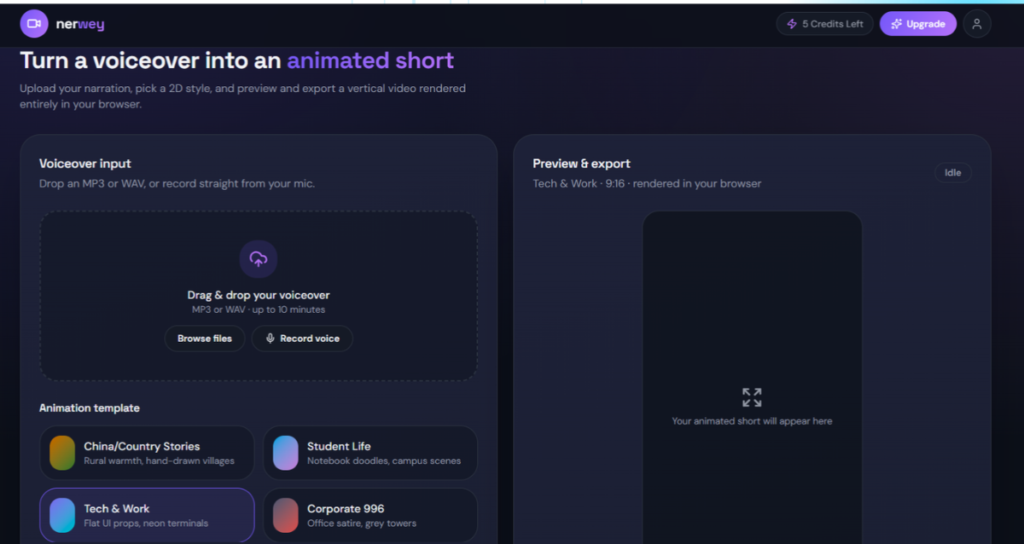
Nerwey.lovable.app is an AI-powered 2D video creation tool that I built to help turn voiceovers and ideas into animated video content. The basic concept starts with the creator’s voice. You can upload your voiceover and use it as the foundation for creating your video. From there, you can decide how much control you want over the creative process.
When I designed this workflow, I wanted the tool to work for different types of creators. Some people enjoy controlling every part of a video, while others simply want to provide their content and let AI handle most of the work. My experience showed me that both users can exist at the same time, so I decided not to force everyone into one workflow.
The main idea behind nerwey.lovable.app is therefore flexibility. You can take the manual route if you want detailed control, or you can choose the AI route when you want the system to do more of the editing. This makes the tool less about replacing the creator and more about giving the creator different ways to reach the final video.
How Voiceover Works in Nerwey
The first thing that makes nerwey.lovable.app different from a traditional animation workflow is the role of voiceover. Instead of starting with an empty canvas and building everything from zero, you can begin by uploading your voice. That voice becomes an important part of the video creation process.
I wanted this approach because voiceovers already contain a story, explanation, or message. In my experience, starting with narration can make video creation feel much more natural. Instead of asking yourself what you should put on the screen first, you already have the spoken content that can guide the visual direction.
Once the voiceover becomes the foundation, the creator can move into the animation workflow. The goal is to connect the spoken content with 2D animated visuals so that the final result feels like a complete video rather than just audio with random images.
The Manual Mode Gives Me More Control
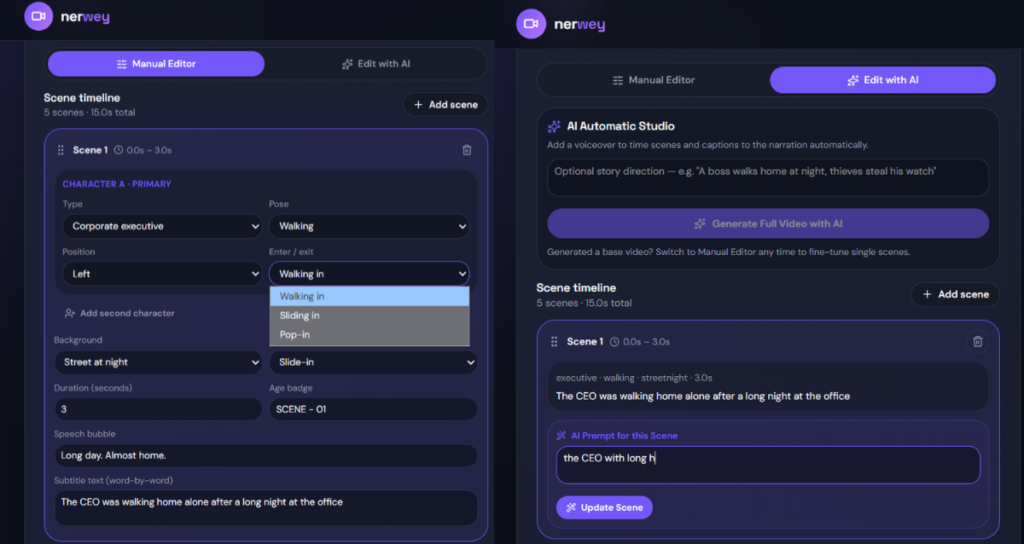
One of the two main options inside nerwey.lovable.app is the manual mode. I created this option because I know that many creators want control over what appears in their videos. With manual editing, you can select characters and build your scenes according to your own idea.
My experience has taught me that AI cannot always understand exactly what a creator has imagined. Sometimes you already know which character should appear, what the scene should look like, or how you want the visual sequence to move. In those situations, manual control becomes extremely useful.
The manual workflow lets the creator make adjustments according to their own preferences. You can choose the elements you want and shape the video instead of simply accepting an automatic result. For me, this is an important part of Nerwey because I want the creator to remain involved in the creative process.
The AI Mode Makes Video Creation Easier
The second major option inside nerwey.lovable.app is the AI workflow. This is the part I am especially interested in developing further because my goal is to make video creation increasingly automatic.
With the AI option, the idea is that the system can work on the video for you instead of requiring you to build every scene yourself. You provide the voiceover and let the AI handle much more of the editing process. This can save time for someone who wants to focus on the content rather than the technical details.
I noticed while building the concept that automation becomes much more useful when users can still make changes afterward. That is why the AI workflow does not have to be the end of the process. After the AI creates or edits the video, you can still guide further changes using prompts.
AI Editing Does Not Mean Losing Control
One thing I wanted to make clear with Nerwey.lovable.app is that choosing AI does not mean giving up control completely. The AI can create or edit the video, but the creator can still communicate what they want to change.
This prompt-based editing is one of the ideas I find most interesting. Instead of manually searching through every setting, the creator can describe the change they want. My experience with AI tools has shown me how natural it can feel to explain a desired change in normal language rather than searching through complicated menus.
For example, after the AI creates a video, the creator may decide that something needs to look different. Instead of starting over, the idea is to use a prompt to tell the AI what should change. This creates a workflow where the AI produces a version first and then continues helping with refinement.
Manual vs AI: Two Different Ways to Create
The manual and AI modes inside nerwey.lovable.app are designed for different creative preferences. Manual mode is for someone who wants to select characters, arrange scenes, and make adjustments personally. AI mode is for someone who wants the system to handle more of the video editing.
| Feature | Manual Mode | AI Mode |
|---|---|---|
| Character selection | Creator chooses | AI assists with creation |
| Scene creation | Creator controlled | AI handles more of the workflow |
| Adjustments | Manual controls | Prompt-based changes |
| Creative control | High | AI-assisted |
| Best for | Detailed editing | Faster video creation |
| Workflow | Hands-on | Automated |
| Refinement | Creator edits | Creator can prompt changes |
I built these two options because I do not think there is only one correct way to create a video. Some creators enjoy being involved in every decision, while others want to reach the result faster. Having both approaches allows nerwey.lovable.app to serve both preferences.
My goal is not to say that one mode is better than the other. Manual mode gives you control, while AI mode gives you convenience. The interesting part is that both can exist inside the same tool, allowing the creator to choose the workflow that feels right for a particular project.
Why I Built Nerwey Around 2D Animation
I chose 2D animation because it provides a simple and flexible way to tell stories visually. A creator does not necessarily need complex 3D production to explain an idea, tell a story, or create an engaging short video.
When I was thinking about the product, I wanted to focus on making the process approachable. My experience made me realize that a simple visual style can sometimes communicate an idea more clearly than an overly complicated production. Characters, backgrounds, movement, narration, and captions can work together without requiring a huge production workflow.
That is why 2D animation became an important part of Nerwey.lovable.app. It gives the project a clear creative direction while leaving room for the manual and AI systems to evolve.
What I Want to Improve in the Future
The current version of nerwey.lovable.app is only the beginning of what I want to build. One of my biggest future goals is to make the AI much more capable of controlling the complete video creation process.
My vision is that a creator should eventually be able to provide a voiceover and let the AI understand the content, create suitable scenes, manage the editing, and prepare a much more complete video automatically. I want to reduce the amount of repetitive work without removing the creator’s ability to make decisions.
Another major part of my future plan is making the product a paid tool. I am considering a paid version because continuing to develop an AI product requires ongoing work and resources. However, I want any future paid version to provide genuine value rather than simply putting basic functionality behind a payment.
My Plans for Voice Cloning
Voice cloning is another feature I want to explore for Nerwey.lovable.app in the future. The idea is to allow creators to work with an authorized version of their own voice so they can create narration more conveniently.
I think this feature could fit naturally into the existing voiceover workflow. Today, the creator can provide a voiceover. In the future, I would like the process to potentially include an authorized voice model that can generate narration for new scripts.
I also understand that voice technology needs responsible safeguards. If I introduce voice cloning, I want it to focus on voices that the user has permission to use, especially their own voice. For me, convenience should not come at the cost of trust.
My Bigger Vision for Nerwey
When I look at nerwey.lovable.app, I do not see it as just a 2D animation editor. I see the beginning of a larger AI video creation system. My goal is to bring voice, animation, editing, automation, and eventually voice technology together in one workflow.
My experience building the project has taught me that the most useful AI tools are not necessarily the ones with the most features. They are the ones that solve a real problem without making the user feel overwhelmed. That is the experience I want to continue creating with Nerwey.
In the future, I want a creator to be able to start with a voiceover, choose how much control they want, and let Nerweydo the rest. If they want full control, manual editing should be there. If they want automation, AI should handle more of the process. If something needs changing, prompts should make refinement easier.
Final Thoughts
I built Nerwey.lovable.app because I wanted to make 2D video creation simpler. The idea started with voiceover-driven video creation and grew into a system with two different approaches: manual editing for creators who want control and AI editing for creators who want automation.
My experience has shown me that both approaches have value. Manual editing gives creators the freedom to select characters and adjust their videos according to their own ideas. AI editing can reduce repetitive work and help creators reach a finished video faster. The ability to make further changes through prompts adds another layer of flexibility.
The future of Nerwey.lovable.app is even more ambitious. I want to make the AI capable of controlling more of the complete video workflow. I am also considering a paid version and want to explore authorized voice cloning so creators can have an even more connected production experience.
For me, Nerwey is not a finished destination. It is a project that I am continuing to develop and improve. I built it around a simple belief: creating a video should not always require complicated production skills or hours of repetitive editing.
My goal is to keep pushing Nerwey.lovable.app toward a future where creators can bring their voice and ideas to the platform, choose how much control they want, and let AI handle the work that slows them down—while they remain in control of the story.
Frequently Asked Questions
What is Nerwey.lovable.app?
Nerwey. lovable.app is an AI-powered 2D video creation tool that I built around voiceover-based video production. It gives creators both manual and AI-assisted ways to create and edit animated videos.
How does the voiceover feature work?
You can upload your voiceover and use it as the foundation for your video. The voice provides the spoken content around which the animated video can be created.
What is the difference between Manual and AI mode?
Manual mode gives you more direct control over characters, scenes, and adjustments. AI mode allows the system to handle more of the video editing, while you can still request changes through prompts afterward.
Will Nerwey.lovable.app become paid?
A paid version is part of my future plans. I want to build a sustainable product that can continue receiving improvements and new capabilities while providing meaningful value to users.
Will Nerwey have voice cloning?
Voice cloning is part of my future vision. If I add it, my intention is to focus on authorized voice use, particularly allowing creators to work with their own voice responsibly.